2015/12/01

Millions of Internet Things are “secured” by the same “private” keys

Millions of Internet Things are “secured” by the same “private” keys

European security consultancy SEC Consult has spent time over the past few years looking at embedded devices on the internet.
Embedded devices are what you might call the high end of the Internet of Things (IoT) – or, to use the cynic’s description: tiny computers, usually built down to a price, embedded in houselhold devices for which form, function and price come way ahead of security, if security is even considered at all.
SEC Consult has examined thousands of devices such as internet gateways, routers, modems, IP cameras, VoIP phones, and more, from over 70 vendors.
The researchers took two approaches:
  • Analyse device firmware images for cryptographically-related content. (Many devices are Linux-based, so the firmware and its source code are supposed to be public.)
  • Perform internet scans to examine devices that are connected to the internet. (This is not hacking, just looking for services that are already explicitly available from the public side of the network.)
One of the things they looked for was cryptographic keys for the SSH and TLS protocols.
SSH is typically used to secure remote logons or file copying; TLS is typically used to secure web traffic using HTTPS.
Both these protocols use what’s called public-key cryptography, where the server generates a special keypair when it is installed or first starts up, consisting of:

  • A public key, which you tell to everyone, used to lock transactions to and from the server.
  • A private key, the only way to unlock data that was locked with the public key.
The idea is simple: by having a two-key lock of this sort, you don’t have to share a secret key with the other end before you first communicate, and you don’t have to worry about sharing that secret key with someone who later turns out to be a crook.
The vital part of this two-key system is the rather obvious requirement that you keep the private keyprivate, thus the name private key.
Generally speaking, your private key is for you to use on your server, to secure your (and your customers’) traffic.
If you let anyone else get a copy of your private key, you’re in real trouble, because they could set up an imposter site, and use your private key to convince visitors that they were you.
Or they could intercept traffic between you and your customers, and use your private key to unscramble it later on.
Carelessness with a private key is like letting someone else borrow your signing seal. (These are still widely used in the East, though they have long died out in the West.)
With your signet ring on his finger, a crook could sign a completely fake document in our name, or open up a sealed document you’d already sent and then re-seal it so the recipient would never know.
You’d think, therefore, that private keys on embedded devices would be something any vendor would take seriously: one device, one key, generated uniquely and randomly, either on first use or securely in the factory.
But SEC Consult found the following rather alarming facts:
  • 3.2 million devices were using one of just 150 different TLS private keys.
  • 0.9 million devices were using one of just 80 different SSH private keys.
Remember, these were all keys that the researchers found uncontroversially by looking, without any hacking, whether white-hatted, grey-hatted or black-hatted.
In other words, we should assume that every cybercrook worth his salt (yes, that’s a pun!) already has these 230 digital signet rings handy, ready to wield them whenever convenient.
Worse still, as SEC Consult points out, it’s extremely unlikely that all of the millions of devices mentioned above were supposed to be accessible, whether by TLS or SSH, over the internet, especially since many of the TLS-protected web services, and most of the SSH ones, relate to administration and configuration of the device itself.
On most networks, administration access is supposed to be limited to users on the internal network, if only to reduce the number of places from which a crook could try connecting.

WHAT TO DO?

If you create firmware for embedded devices:

  • Don’t share or re-use private keys. If you generate firmware files for each device, customise the keys in each firmware image and use it once only. If you generate keys when the device first starts up, don’t rely on “random” data sources that are likely to be the same on every router at first boot (e.g how long since the power came on, or how much memory is installed).
  • Don’t enable remote administration by default.
  • Don’t let users activate a new device until they have set all necessary passwords. In other words, get rid of default passwords – every crook has a list of what they are.
If you use embedded devices:

  • Set proper passwords before taking the device online.
  • Only turn on remote administration when genuinely necessary. Also, consider two-factor authentication for external users, to reduce the risk posed by stolen passwords.
  • Verify your remote access settings. Consider using a network diagnostic tool such as nmap. You may as well scan your own network for security mistakes. The crooks will!
  • Re-generate cryptographic keys, if you can, as part of installing the device. This is a way to get rid of any low-quality keys inherited by default. 
2015/08/31

La France, cible prioritaire des attaques DDoS en 2015 selon Kaspersky Lab

La France, cible prioritaire des attaques DDoS en 2015 selon Kaspersky Lab | UnderNews

Voila une information qui ne va pas rassurer les professionnels de l’Internet en France… Et pour cause, l’éditeur de solutions de sécurité russe Kaspersky Lab a publié une étude plaçant la France en première place du podium en termes d’attaques DDoS en Europe lors du second trimestre 2015.

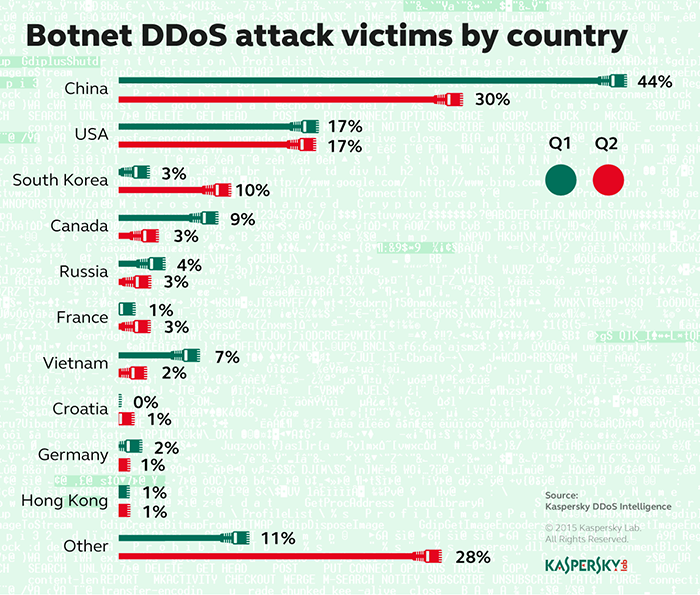
Les trois quarts des ressources attaquées au deuxième trimestre de 2015 par des botnets se situent dans 10 pays seulement, selon les statistiques du système Kaspersky DDoS Intelligence.

En tête du classement, les Etats-Unis et de la Chine enregistrent un grand nombre d’attaques à cause du faible coût d’hébergement de ces pays. Cependant, les changements dans les autres positions du classement et le nombre croissant de pays affectés par ce type d’attaque prouvent qu’aucun territoire n’est sécurisé face aux attaques DDoS. 

Faits clés : 
  • Le nombre de pays où les ressources attaquées ont été localisés a augmenté de 76 à 79 au cours du deuxième trimestre de 2015 ;
  • Dans le même temps, 72% des victimes se situaient dans seulement 10 pays ;
  • Cependant, ce chiffre a diminué comparé à la période précédente, avec 9 victimes sur 10 présentes dans le top 10 au premier trimestre. 
Répartition des cibles uniques des attaques DDoS par pays, Q2 vs. Q1 2015 


Le top 10 du deuxième trimestre incluait la Croatie, tandis que les Pays-Bas ont quitté le classement. La Chine et les Etats-Unis ont gardé leurs positions dominantes ; la Corée du Sud a fait descendre le Canada de sa troisième place. La cause en est une explosion des activités de botnets, la plupart ciblant la Corée du Sud. En outre, la proportion d’attaques localisées en Russie et au Canada a diminué comparé au trimestre précédent.

« Les techniques d’ingénierie sociale, l’apparition de nouveaux types d’appareils avec accès internet, les failles logicielles et la sous-estimation de l’importance d’une protection anti-malware ont contribué à la diffusion des botnets et à l’augmentation du nombre d’attaques DDoS. Par conséquent, des entreprises complètement différentes peuvent être ciblées indépendamment de leur location, de leur taille ou de leur type d’activité. La liste des victimes protégées des attaques DDoS par Kaspersky Lab au second trimestre 2015 incluait des organisations gouvernementales, des institutions financières, des médias de masse et même des institutions éducatives » a commenté Evgeny Vigovsky, Directeur de Kaspersky DDoS Protection, chez Kaspersky Lab. 

Les statistiques de Kaspersky DDoS Intelligence ont également montré des changements significatifs dans la quantité d’attaques DDoS basées sur des botnets à travers le temps : 
  • Une forte augmentation du nombre d’attaques a été observée dans la première semaine de mai, tandis que la fin du mois de juin montrait la plus faible activité ;
  • Le pic d’attaques par jour (1960) a été enregistré le 7 mai ;
  • Le jour le plus « calme » a été le 25 juin avec seulement 73 attaques enregistrées ;
  • Dans le même temps, la plus longue attaque DDoS du trimestre a duré 205 heures (8,5 jours).
Concernant la technologie sur laquelle sont basées les attaques, les cybercriminels impliqués dans le développement de botnets DDoS investissent de plus en plus dans la création de botnets d’appareils de systèmes de réseaux comme les routeurs et modems DSL. Ces changements annoncent sûrement une augmentation du nombre d’attaques DDoS utilisant des botnets à l’avenir. 

Kaspersky DDoS Intelligence Report Q2 2015

Pour en apprendre plus sur les principes qui sous-tendent Kaspersky DDoS Protection, vous pouvez consulter ce document. La version complète du rapport sur les données reçues du système de surveillance Kaspersky DDoS Intelligence est disponible sur Securelist.com. 

Attaques DDoS – Une problématique d’envergure

Ce type de cyberattaque est aujourd’hui simple à mettre en place et peut coûteux. Ces points sont les principales raisons qui font que le DDoS est en vogue. Malheureusement, les DDoS font des ravages assez facilement, anéantissant n’importe quel business dans un laps de temps assez ridicule… Comble du comble, les mesures de protection contre ce type d’attaque sont hors de prix, alors que les outils d’attaques sont très peu cher et largement accessibles à tous.

Par ailleurs, une technique de chantage de plus en plus exploitée par les cybercriminels aux USA a mené le CERT USA à lancer une alerte sur l’extorsion de fonds touchant les entreprises, le 17 août 2015. Et idem du côté de l’Internet Crime Center (IC3).

Loi de Murphy de Moore

Loi de Murphy de Moore


2015/07/27

New research: Comparing how security experts and non-experts stay safe online

Google Online Security Blog: New research: Comparing how security experts and non-experts stay safe online

Today, you can find more online security tips in a few seconds than you could use in a lifetime. While this collection of best practices is rich, it’s not always useful; it can be difficult to know which ones to prioritize, and why.

Questions like ‘Why do people make some security choices (and not others)?’ and ‘How effectively does the security community communicate its best practices?’ are at the heart of a new paper called, “...no one can hack my mind”: Comparing Expert and Non-Expert Security Practices” that we’ll present this week at the Symposium on Usable Privacy and Security.

This paper outlines the results of two surveys—one with 231 security experts, and another with 294 web-users who aren’t security experts—in which we asked both groups what they do to stay safe online. We wanted to compare and contrast responses from the two groups, and better understand differences and why they may exist.

Experts’ and non-experts’ top 5 security practices

Here are experts’ and non-experts’ top security practices, according to our study. We asked each participant to list 3 practices:


Common ground: careful password management

Clearly, careful password management is a priority for both groups. But, they differ on their approaches.

Security experts rely heavily on password managers, services that store and protect all of a user’s passwords in one place. Experts reported using password managers, for at least some of their accounts, three-times more frequently than non-experts. As one expert said, “Password managers change the whole calculus because they make it possible to have both strong and unique passwords.”

On the other hand, only 24% of non-experts reported using password managers for at least some of their accounts, compared to 73% of experts. Our findings suggested this was due to lack of education about the benefits of password managers and/or a perceived lack of trust in these programs. “I try to remember my passwords because no one can hack my mind,” one non-expert told us.

Key differences: software updates and antivirus software

Despite some overlap, experts’ and non-experts’ top answers were remarkably different.

35% of experts and only 2% of non-experts said that installing software updates was one of their top security practices. Experts recognize the benefits of updates—“Patch, patch, patch,” said one expert—while non-experts not only aren’t clear on them, but are concerned about the potential risks of software updates. A non-expert told us: “I don’t know if updating software is always safe. What [if] you download malicious software?” and “Automatic software updates are not safe in my opinion, since it can be abused to update malicious content.”

Meanwhile, 42% of non-experts vs. only 7% of experts said that running antivirus software was one of the top three three things they do to stay safe online. Experts acknowledged the benefits of antivirus software, but expressed concern that it might give users a false sense of security since it’s not a bulletproof solution.

Next Steps

In the immediate term, we encourage everyone to read the full research paper, borrow experts’ top practices, and also check out our tips for keeping your information safe on Google.

More broadly, our findings highlight fundamental misunderstandings about basic online security practices. Software updates, for example, are the seatbelts of online security; they make you safer, period. And yet, many non-experts not only overlook these as a best practice, but also mistakenly worry that software updates are a security risk.

No practice on either list—expert or non-expert—makes users less secure. But, there is clearly room to improve how security best practices are prioritized and communicated to the vast majority of (non expert) users. We’re looking forward to tackling that challenge.

2015/07/10

OpenSSL CVE-2015-1793 (cert. verification bug) – what you need to know


If you have anything to do with web security, like we do, you've probably been in "bated breath" mode this week.

That's because the OpenSSL team announced, on Monday 2015-07-06, that it had a "high severity" update coming out in three days' time, meaning today, Thursday 2015-07-09:"
The OpenSSL project team would like to announce the forthcoming release of OpenSSL versions 1.0.2d and 1.0.1p.
These releases will be made available on 9th July. They will fix a single security defect classified as "high" severity. This defect does not affect the 1.0.0 or 0.9.8 releases.
And that's all she wrote.

What is OpenSSL?

OpenSSL is a very widely used internet security toolkit that implements a cryptographic security protocol called TLS/SSL, and puts the "S" in HTTPS for a great many websites.
OpenSSL is also widely known because of the Heartbleed vulnerability, uncovered in 2014.
Heartbleed meant that almost anyone with an internet connection could suck secret data out of your servers at will, without actually needing to break in or even to do any sort of hacking.
To trigger the Heartbleed bug, you merely asked the server to send you a so-called keep-alive message.
A keep-alive system is an uncontroversial feature that many internet protocols support, because keeping an existing connection going is a lot less complicated than starting a new one.
Keep-alives are a bit like those short conversations about not very much that you have every now and then when you're travelling in a car at night, just to make sure the driver's still alert.
The Heartbleed problem was that you could ask the server to send you a keep-alive response that was much larger than the memory buffer it was using to process your keep-alive message, and it would happily oblige.
So, you'd receive a reply that included your message, followed by random extra stuff out of server memory that you weren't supposed to see.
Most of it would be harmless, but every now and then you might get hold of snippets of other people's traffic, passwords, encryption keys, and more.

Waiting for the fix

These historical facts – the prevalence of OpenSSL and bad memories of Heartbleed – meant that OpenSSL's terse email notification on Monday wasn't very comforting.
Why an update just for a single security hole? How "high" was the high severity?
Was this going to be a denial-of-service bug? Or would it be a data leakage hole, like Heartbleed?
Or a full-on remote code execution flaw that would allow outsiders to run commands on your server as if they were actually logged in to your network?
More specifically, would all sub-versions of OpenSSL in the 1.0.1 and 1.0.2 series be at risk, or would some releases turn out to be OK?
How to prepare for what was coming on Thursday?

The flaw

The update is out, and our verdict is that the bug isn't as bad or as widespread as we feared at first.
Nevertheless, if you're vulnerable, you need to act.
Simply explained, CVE-2015-1793 is a certificate verification flaw.
This means that crooks who can lure or misdirect you to a bogus website (or email server, or indeed any internet service using TLS/SSL for its security) may be able trick you into thinking that you are somewhere legitimate and secure.
As you probably know, TLS/SSL relies on a "chain of trust" formed by cryptographic certificates.
This chain of certificates reassures you that the secure website you are visiting really does belong to the organisation you expect.
Here's an example we've used before, based on Naked Security itself:


Naked Security's certificate is owned by Sophos; Sophos's right to represent itself as Naked Security is vouched for by GlobalSign; and GlobalSign's right to vouch for Sophos is vouched for by Firefox.
If crooks created their own certificate claiming to be Sophos, and used it to vouch for a fake version of Naked Security, they'd almost certainly come unstuck.
Your browser would complain: the certificate presented by the crooks wouldn't be vouched for by any trusted certificate authority (CA).
You'd see a warning like this:


→ Wrongly-signed certificates do turn up from time to time, and can cause serious security problems. Bad certificates are often down to an insecure, venal orincompetent CA. CAs who don't take security seriously are usually thrown out by the major browser makers, thus effectively cancelling all certificates they've signed. The errant CA will be expected to show strong reasons before it will be trusted again.

Effects of the bug

This latest bug in OpenSSL means that a crook may be able to create a certificate in someone else's name, and then to sneak it past OpenSSL's certificate verifcation process without without triggering a warning, even though the certificate isn't signed by a trusted CA.
That makes a man-in-the-middle (MiTM) attack feasible, where a crook intercepts your traffic, say to a social networking site; feeds you a fake login page with a fake HTTPS certificate; and convinces you to give away your password because the warnings that ought to prevent the phishing deception never show up.

How big is the risk?

Fortunately, the scope of this bug is narrower than we feared after reading Monday's OpenSSL advisory.
First, this bug doesn't give cybercrooks the ability to steal data or break into your servers directly, because:
Crooks can't bleed confidential data from your server at will, as with Heartbleed.
Crooks can't sniff (record) arbitrary network traffic and crack the TLS encryption later.
Crooks can't send malformed data packets and break into your web, email, or other OpenSSL-protected servers.
Second, only four of the many officially-supported OpenSSL versions are affected:
Versions 1.0.2b and 1.0.2c need updating to 1.0.2d. (The -a and -b sub-versions are immune.)
Versions 1.0.1n and 1.0.1o need updating to 1.0.1p. (Sub-versions up to and including -n are immune.)
All 0.9.8 versions are immune.
All 1..0 versions are immune.
Third, most servers (unless they connect to other servers, or do reverse certificate verification of clients, which is rare) are not affected, because this certificate trickery affects the client that is connecting, not the server it is connecting to.
Fourth, all the Big Four web browsers – Internet Explorer, Firefox, Safari and Chrome – do not use OpenSSL and are therefore immune.

What to do?

Many products other than web browsers, including software updaters, RSS feed readers, scripting tools and email clients, not only use TLS/SSL but may include code from OpenSSL.
These may need updating.
If you aren't sure, ask the maintainers (for open source products) or your vendor (for commercial software) to tell you whether they use OpenSSL, and whether the products needs updating.

What about Sophos products?

The good news is that Sophos products are not at risk from this bug.
Only the current pre-release version of Sophos Management Communication System (MCS 3.0.0 Beta) includes an affected version of OpenSSL.
However, MCS does not use the buggy part of the OpenSSL code, so cannot fall foul of the bug. (Nevertheless, we expect to update MCS 3 Beta with the latest OpenSSL version by mid-August 2015.)
All other Sophos product families either don't use OpenSSL at all, or use one of the unaffected versions.
This list includes: Sophos UTM, Sophos Secure Web Gateway, Sophos Secure Email Gateway, PureMessage for Unix/Linux, Sophos Antivirus/Sophos Endpoint Protection, Sophos for vShield, Sophos Cloudand Sophos Mobile Control (server and mobile apps).